
Open the article in a separate window
Symptoms:
V10 displays as "Software Not Activated" after entering your email and password.
During the activation process, the user cannot select their school.
The school has a current SMA.
Cause 1:
The version of your software is older than 10.1.0.151. Please download the latest V10 and try again.
Cause 2:
The time on your system clock is inaccurate, preventing authentication.
Resolution:
Sync your time with time.windows.com so that it is accurate.
- Open Settings
- Click on Time & Language
- Click on Date & time
- Set the time automatically to "ON"
- Under “Synchronize your clock,” click the Sync now button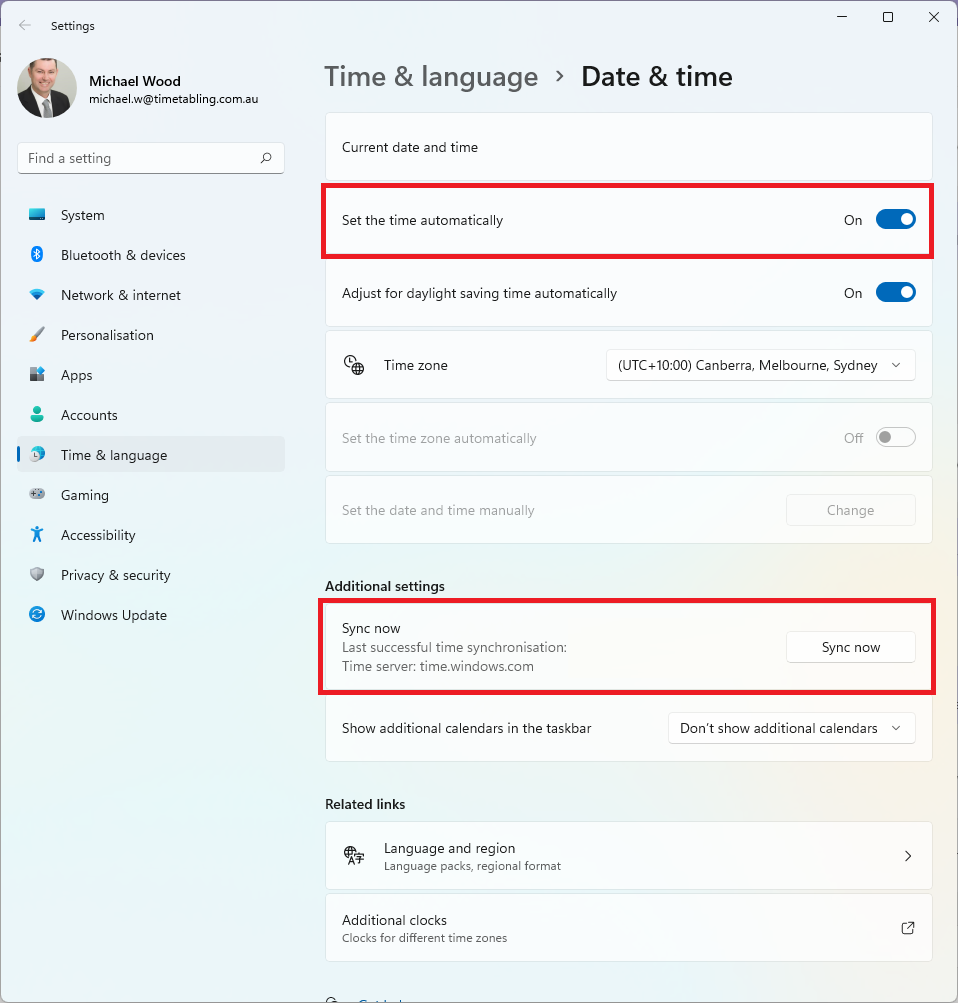
Additional Resources
How to Resync the System Clock for domain-joined or Intune-managed devices - Timetabling Solutions Knowledge Base
How to Check Windows Time Sync Status (w32tm /query /status) - Timetabling Solutions Knowledge Base